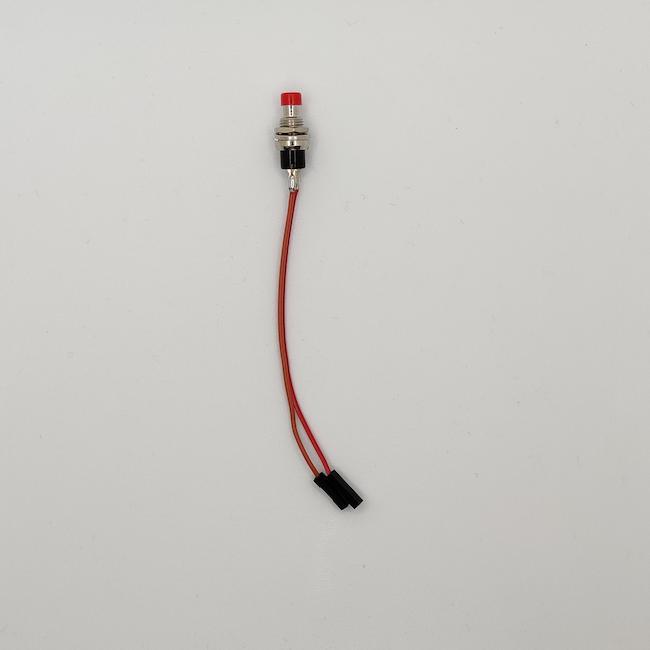
I have seen the idea to support a physical switch to trigger the shutdown command on your Stratux FLARM, powered by a Raspberry PI 3 or 4. This is much safer than just cutting the power, which can corrupt the SD card.
Why a Safe Shutdown Switch?
When you simply cut power to a Raspberry Pi:
- The file system may be corrupted
- The SD card can be damaged over time
- You may lose configuration changes
- Log files may be incomplete
A proper shutdown sequence:
- Closes all open files
- Unmounts the file system cleanly
- Prepares the SD card for power off
- Preserves your data and settings
What You Need
- Momentary push button switch
- Two jumper wires
- Basic soldering skills (optional, can use breadboard)
- Access to Raspberry Pi GPIO pins
Hardware Setup
GPIO Pin Selection
We'll use:
- GPIO 21 (Pin 40): Signal input from the button
- Ground (Pin 39): Ground connection
Wiring Diagram
Button Terminal 1 -----> GPIO 21 (Pin 40)
Button Terminal 2 -----> Ground (Pin 39)
The button connects GPIO 21 to ground when pressed.
Software Configuration
Step 1: Enable GPIO Shutdown
SSH into your Stratux:
ssh pi@192.168.10.1Step 2: Edit the boot configuration
sudo nano /boot/config.txtAdd this line at the end:
dtoverlay=gpio-shutdown,gpio_pin=21Step 3: Reboot to apply changes
sudo rebootTesting the Switch
1. Wait for Stratux to fully boot
2. Press and hold the shutdown button for about 3 seconds
3. The Raspberry Pi should initiate shutdown
4. Wait for the green LED to stop blinking
5. The system is now safe to power off
Alternative: Shutdown Script
For more control, you can create a custom shutdown script:
#!/usr/bin/env python3
import RPi.GPIO as GPIO
import os
import time

GPIO.setmode(GPIO.BCM)
GPIO.setup(21, GPIO.IN, pull_up_down=GPIO.PUD_UP)

def shutdown_callback(channel):
    time.sleep(0.5)  # Debounce
    if GPIO.input(21) == GPIO.LOW:
        os.system("sudo shutdown -h now")

GPIO.add_event_detect(21, GPIO.FALLING, callback=shutdown_callback, bouncetime=300)

while True:
time.sleep(1)Save as /home/pi/shutdown_button.py and add to startup.
Button Placement Ideas
- External case button: Drill a hole in your Stratux case
- Quick-disconnect: Use a connector for easy removal
- Panel mount: Install on your aircraft panel if permanent
LED Indicator (Optional)
Add a status LED to show when it's safe to remove power:
GPIO 20 (Pin 38) -----> LED (+) -----> 330Ω Resistor -----> GroundModify the shutdown script to turn on the LED when shutdown is initiated.
Safety Considerations
- Use a momentary switch to prevent accidental shutdowns
- Consider adding a confirmation delay (hold for 3 seconds)
- Label the button clearly
- Test thoroughly before flying
Conclusion
Adding a safe shutdown switch to your Stratux is a simple modification that can save you from SD card corruption and data loss. The hardware cost is minimal, and the peace of mind is worth it.
Happy building and safe flying!
Related Resources
- How to Add a Safe Shutdown Button (Detailed Guide) - Complete wiring and software guide
- Browse Stratux Systems - Ready-to-fly receivers and DIY components
- Stratux First Time Setup - Get your new Stratux running
- All DIY Tutorials - Step-by-step guides for building and modifying Stratux